
Website
Visit Website
The homepage of the hospital’s frontend website welcomes visitors with a professional and clean design, emphasizing exceptional healthcare for families. It features a prominent image of a doctor in a white coat, symbolizing trust and expertise. The main headline highlights world-class medical care supported by advanced technology and compassionate service. Navigation options include Home, Services, Doctors, Reviews, Book Appointment, and Login. Call-to-action buttons for scheduling appointments and exploring services encourage user engagement. The overall layout is designed to convey reliability and accessibility.

Website Settings
The Hospital Website Settings page allows administrators to configure various aspects of the hospital’s online presence. It includes sections for General Settings, Block Text Settings, Appointment Button Block Settings, Social Settings, and Language Selection. Each option can be customized to manage website content, layout, and functionality. A Submit button saves all changes.

Reviews
The Review section displays customer testimonials for the hospital’s frontend website, including image, name, designation, review text, status, and options. Currently, two reviews are listed from Michael Smith (Business Analyst) and Roberto Carlos (Civil Engineer), both marked as active. Each entry includes options to edit or delete. Users can export data in Excel, CSV, PDF formats or print the list. A search bar allows filtering entries.

Grid Sections
The Grid Sections page manages content blocks displayed on the hospital’s website, including image, category, title, description, position, status, and options. Currently, two entries are listed: “Professional surgeons” and “Good Care,” both categorized as FEATURED and marked as active. Each section includes a placeholder image and sample text. Users can edit or delete entries, export data in Excel, CSV, PDF formats, or print the list. A search bar allows filtering entries.

Gallery
The Gallery section displays a list of images used on the hospital’s website, including position, status, and options for editing or deleting. Currently, six image entries are listed, all marked as active and assigned sequential positions from 1 to 6. Each entry includes options to edit or remove. Users can export data in Excel, CSV, PDF formats or print the list. A search bar allows filtering entries.

Slides
The Slide section manages banner content displayed on the hospital’s website, including image, title, text fields, position, status, and options. Currently, one slide is listed with the title “Exceptional Healthcare For Your Family,” featuring a promotional message about medical care and technology. The slide is marked as active and positioned at number 1. Each entry includes options to edit or delete. Users can export data in Excel, CSV, PDF formats or print the list. A search bar allows filtering entries.

Service
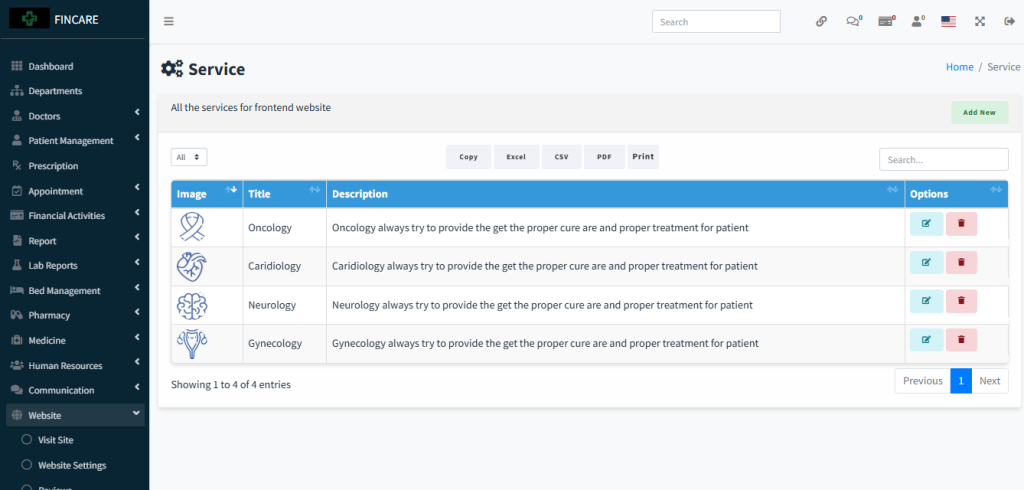
The Service section displays a list of medical services offered by the hospital for the frontend website, including image, title, description, and options. Currently, four services are listed: Oncology, Cardiology, Neurology, and Gynecology, each with a corresponding icon and brief description emphasizing proper treatment and care. Each entry includes options to edit or delete. Users can export data in Excel, CSV, PDF formats or print the list. A search bar allows filtering entries.
Featured Doctors
The Featured Doctors section displays a list of doctors highlighted on the hospital’s frontend website, including image, name, profile, description, and options. Currently, four doctors are listed: Dr. RahmatUllah Asif, Dr. Momenuzzaman, Dr. A.R.M. Jamil, and Dr. Elora Williams, with specialties in Cardiac Specialized and General Physician. Each entry includes options to edit or delete. Users can export data in Excel, CSV, PDF formats or print the list. A search bar allows filtering entries
