
Human Resources
Nurse
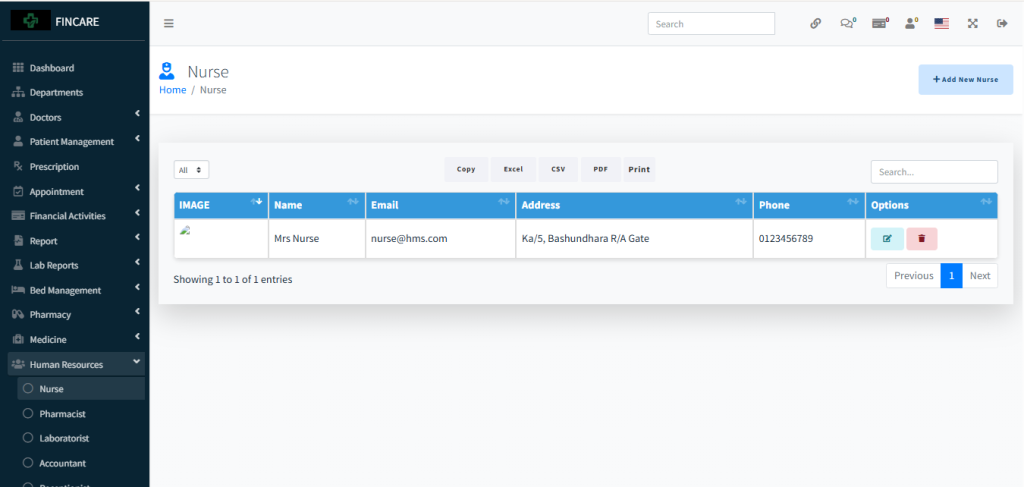
The Nurse section displays a list of registered nurses with details including image, name, email, address, and phone number. Currently, one nurse named Mrs. Nurse is listed with contact information and an associated profile image. Each entry includes options to edit or delete. Users can export the data in Excel, CSV, PDF formats or print the list. A search bar allows filtering entries, and the sidebar provides access to other human resource modules like Pharmacist, Laboratorist, and Accountant.
Pharmacist
The Pharmacist section displays a list of registered pharmacists with details including image, name, email, address, and phone number. Currently, one pharmacist named Mr. Pharmacist is listed with contact information and a profile image. Each entry includes options to edit or delete. Users can export the data in Excel, CSV, PDF formats or print the list. A search bar allows filtering entries.

Laboratorist
The Laboratorist section displays a list of registered laboratory staff with details including image, name, email, address, and phone number. Currently, one laboratorist named Mr. Laboratorist is listed with contact information and a profile image. Each entry includes options to edit or delete. Users can export the data in Excel, CSV, PDF formats or print the list. A search bar allows filtering entries.

Accountant
The Accountant section displays a list of registered accountants with details including image, name, email, address, and phone number. Currently, one accountant named Mr. Accountant is listed with contact information and a profile image. Each entry includes options to edit or delete. Users can export the data in Excel, CSV, PDF formats or print the list. A search bar allows filtering entries.

Receptionist
The Receptionist section displays a list of registered receptionists with details including image, name, email, address, and phone number. Currently, one receptionist named Mr. Receptionist is listed with contact information and a profile image. Each entry includes options to edit or delete. Users can export the data in Excel, CSV, PDF formats or print the list. A search bar allows filtering entries.

Payroll
The Payroll section allows users to manage employee salary records by selecting a month and year, with options to generate payroll data. The interface includes fields for month and year selection, a Generate button to create payroll entries, and a table for displaying staff name, salary, payment date, status, and options. Currently, no payroll entries are listed. Users can search, export data in Excel, CSV, PDF formats, or print the list.

Salary
The Salary section displays a table for managing employee salary records, including staff name, salary amount, and options. Currently, no salary entries are listed in the system. Users can add new salary records through the provided button and export data in Excel, CSV, PDF formats or print the list. A search bar allows filtering entries.

Attendance
The Attendance section displays a monthly calendar view for tracking staff presence, with options to select staff member, month, and year. The grid shows daily attendance for each employee, marked with red “X” symbols indicating present days. Currently, data is displayed for August 2025, covering staff such as Accountant, Laboratorist, Receptionist, Pharmacist, and Nurse. Users can apply filters and export data in Excel, CSV, PDF formats or print the report.

Attendance Reports
The Attendance Report section allows users to generate detailed staff attendance records by selecting a specific employee, year, and month. The interface includes filter options for staff name, year, and month, with a Submit button to process the request. The report displays columns for name, month, clock-in, clock-out, late status, duty hours, and overall status. A summary panel on the right shows total days, present, absent, late, and duty hours. Currently, no data is displayed as the report has not been generated.

Leave
The Leave section displays a table for managing employee leave records, including employee name, leave date, status, type, reason, duration, and options. Currently, no leave entries are listed in the system. Users can add new leave requests through the provided button and export data in Excel, CSV, PDF formats or print the list. A search bar allows filtering entries.

Leave Type
The Leave Type section displays a table for managing categories of employee leave, including type name and options. Currently, no leave types are listed in the system. Users can add new leave types through the provided button and export data in Excel, CSV, PDF formats or print the list. A search bar allows filtering entries.
